
RX Universe Integration
RX Universe Integration - Quick Setup Guide
Table of Contents
Overview
Submit optical lab orders directly to RX Universe manufacturing system with automated validation and error checking.
Features
- One-click order submission
- Real-time validation
- Automatic code discovery
- Remake order handling
- Multi-product support (lenses, treatments, frames, accessories)
Initial Setup
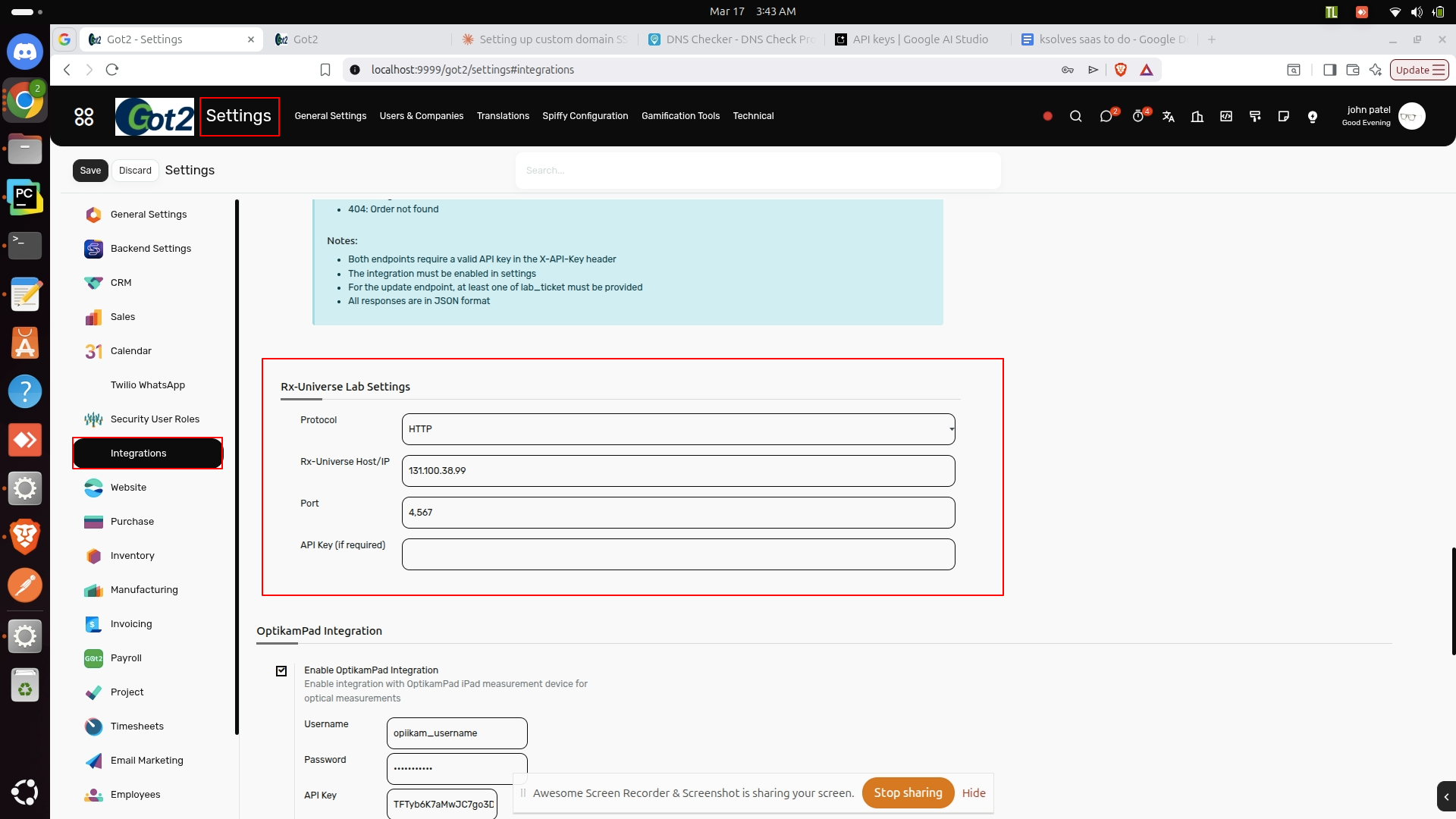
1. RX Universe Lab Settings (Global)
Path: Settings → Integration → RX Universe Lab Settings
Configure the following fields:
| Field | Value | Example | Required |
|---|---|---|---|
| Protocol | HTTP or HTTPS |
HTTP |
Yes |
| RX-Universe Host/IP | Server IP address | 131.100.38.99 |
Yes |
| Port | API port number | 4567 |
Yes |
| API Key | Authentication key | Leave blank for test | No |
. Vendor Setup
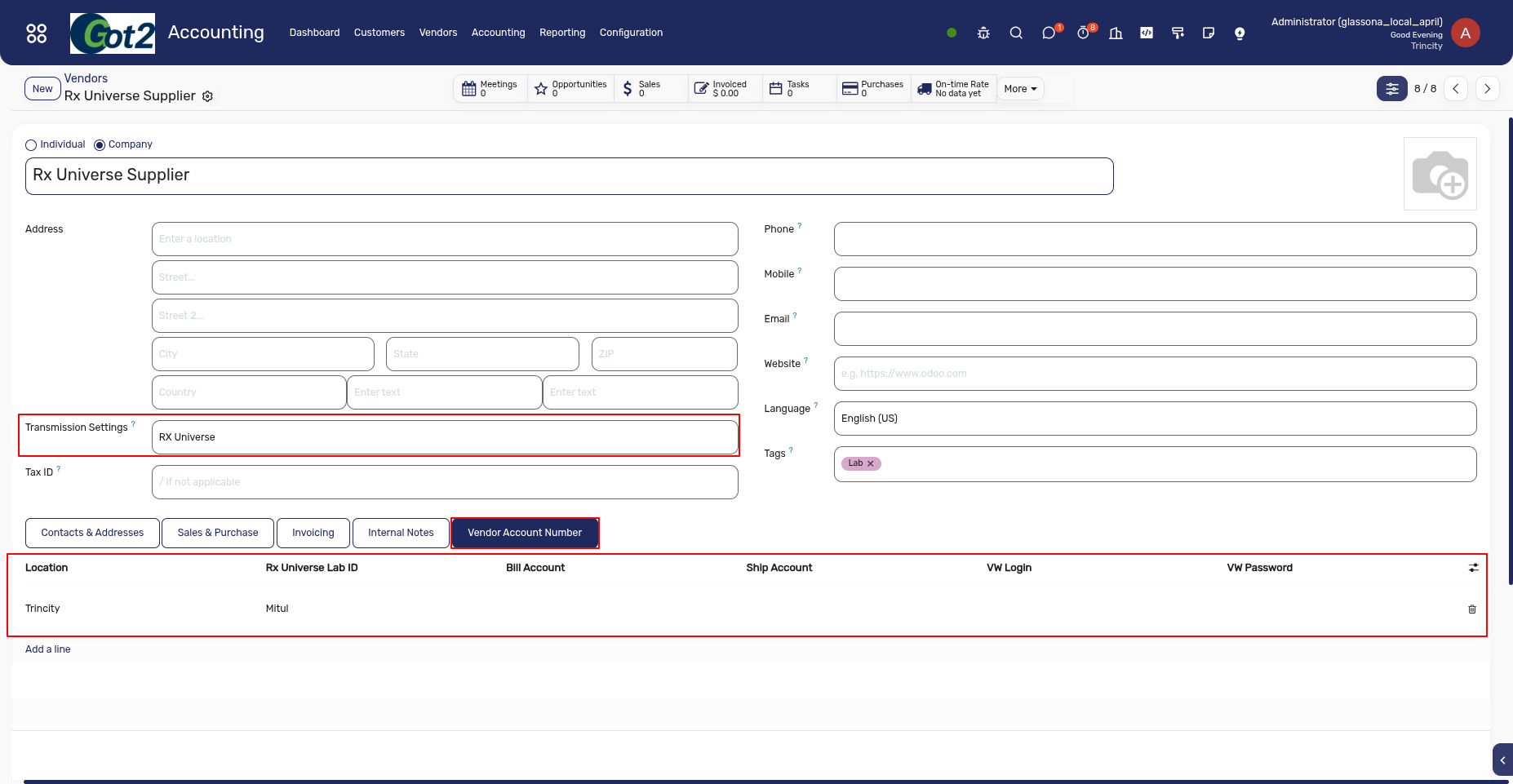
Path: Accounting → Vendors > Vendors
- Find Transmission Method Field
- Set Transmission Method =
RX Universe - Then Find the Vendor Account Number Tab inside that , Just Select the Location and add the Rx Universer Customer Lab ID .
- Save the Record
Example Values:
FS- Test accountSA- Test accountTC,EG,PP,CH,GC- Other test accounts
Product Configuration
A. Lens Products
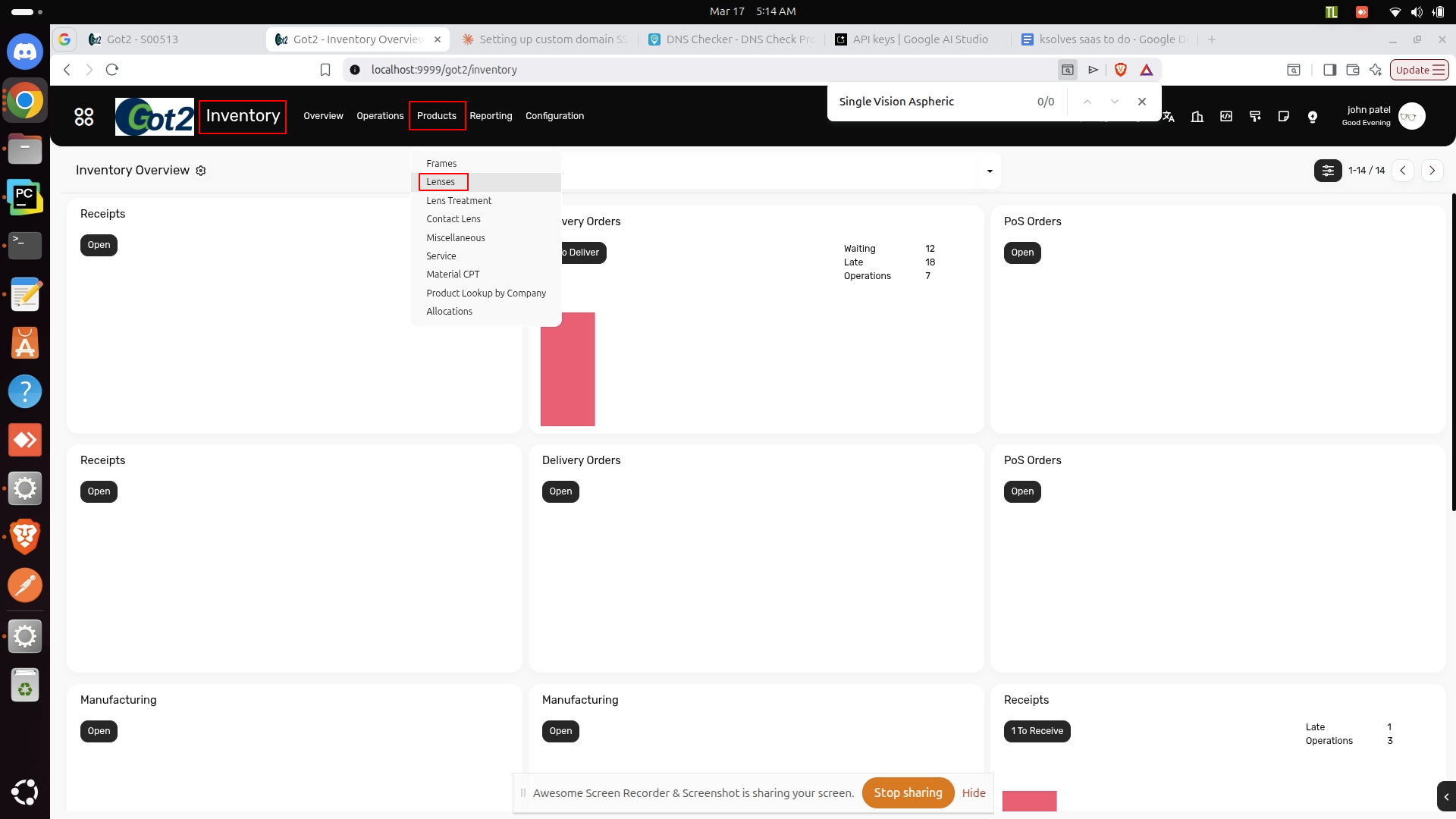
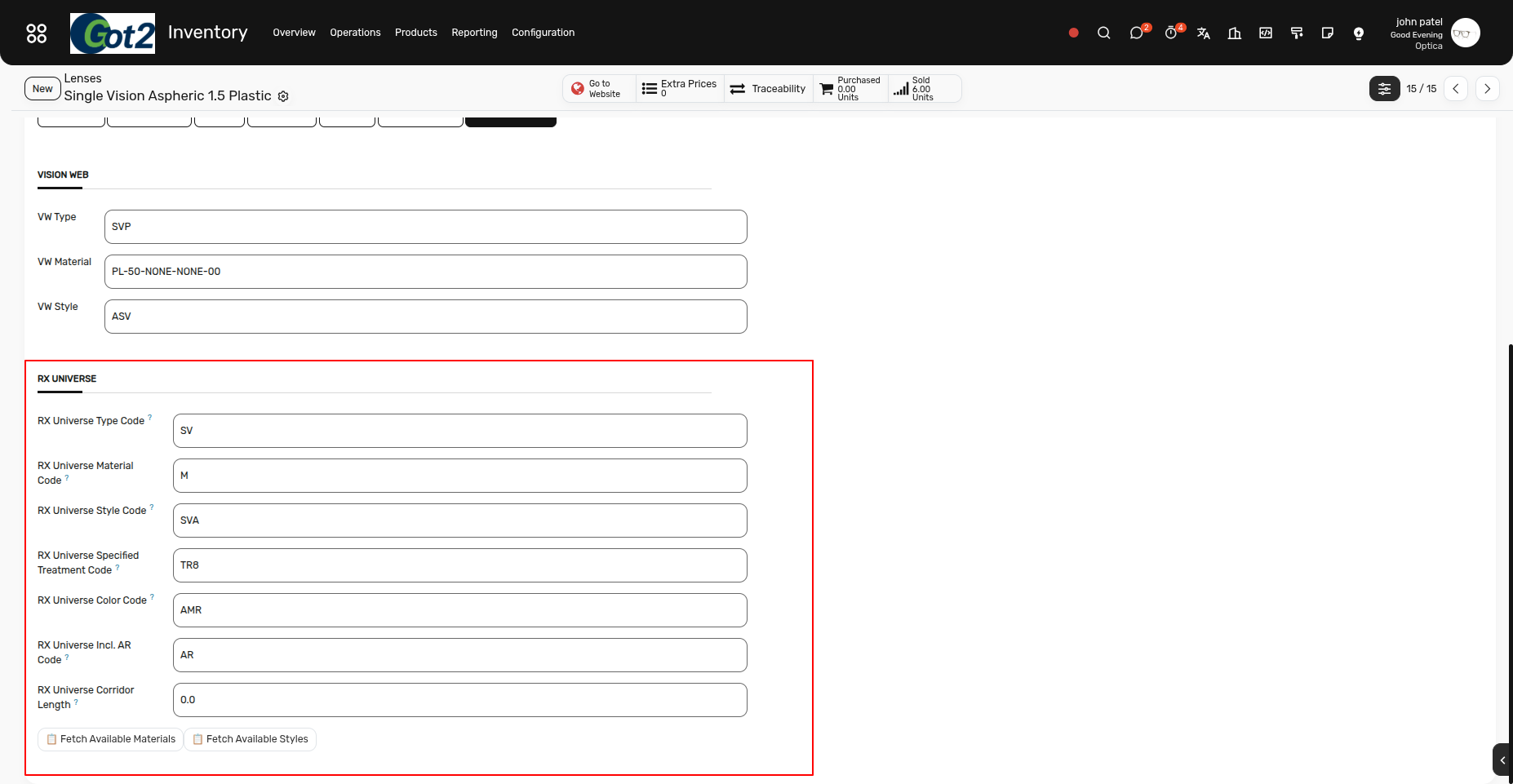
Path: Inventory → Products → Lenses → Lab Mapping Tab
| Field | Example | Required | Notes |
|---|---|---|---|
| Type Code | (blank) | No | Optional |
| Material Code | P or T |
Yes | P=Plastic, T=Transition |
| Style Code | SV |
Yes | SV=Single Vision |
| Corridor Length | 14.0 |
No | Progressive lenses only |
Code Discovery: Click "Fetch Available Materials" or "Fetch Available Styles"
B. Treatment Products
Path: Inventory → Products → Lens Treatment → Lab Mapping Tab
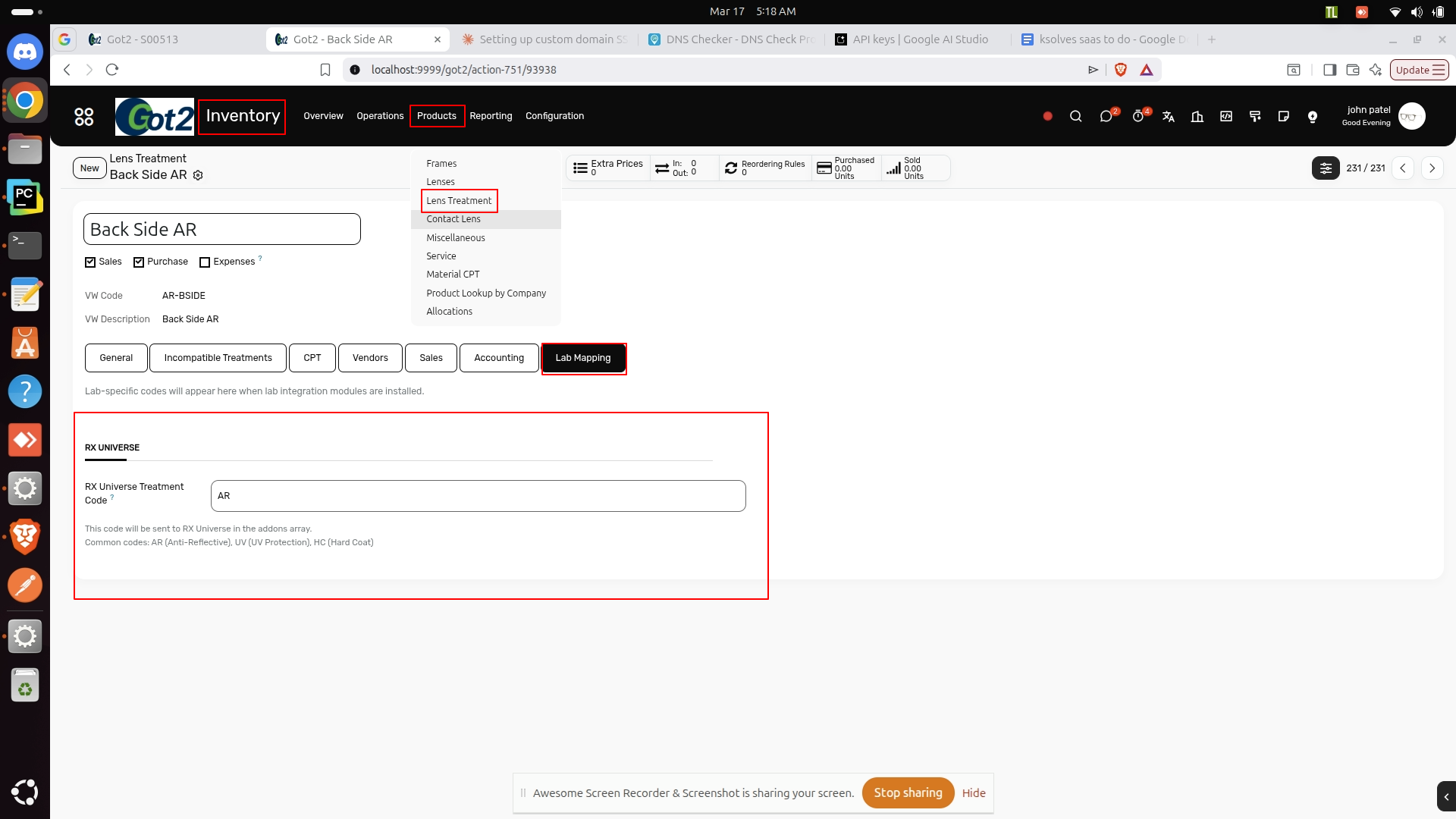
| Product | Code |
|---|---|
| Anti-Reflective | AR |
| UV Protection | UV |
| Hard Coat | HC |
| Blue Light Filter | BLF |
Note: Products with category type lens_treatment and RX Treatment Code will be sent in addons array.
C. Frame Types
Path: Inventory → Configuration → Frame Types → [Type] → Lab Mapping Tab
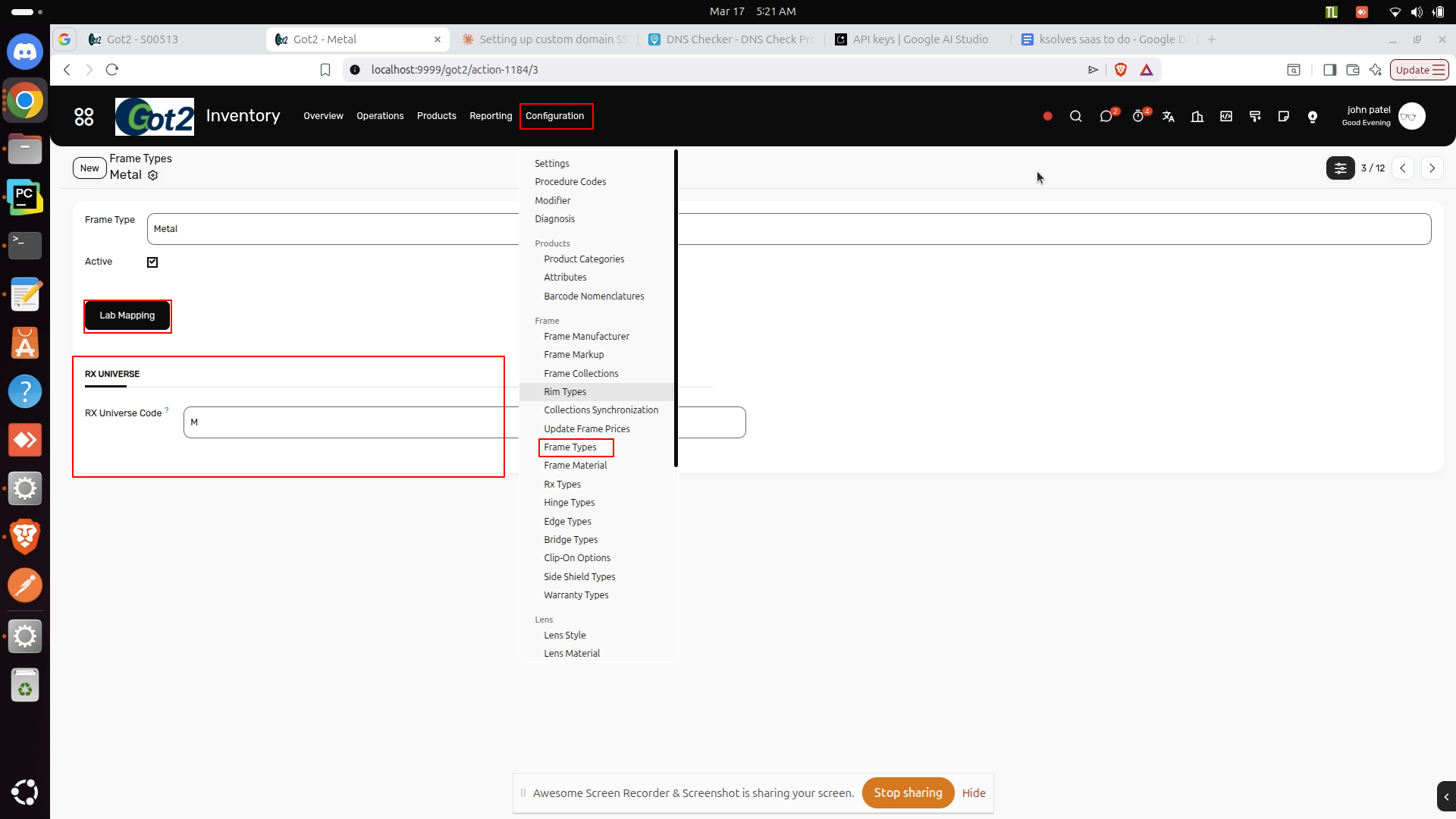
| Frame Type | Code |
|---|---|
| Full Rim | FULL |
| Semi-Rimless | SEMI |
| Rimless | RIMLESS |
D. Miscellaneous Products
Path: Inventory → Products → Miscellaneous → Lab Mapping Tab
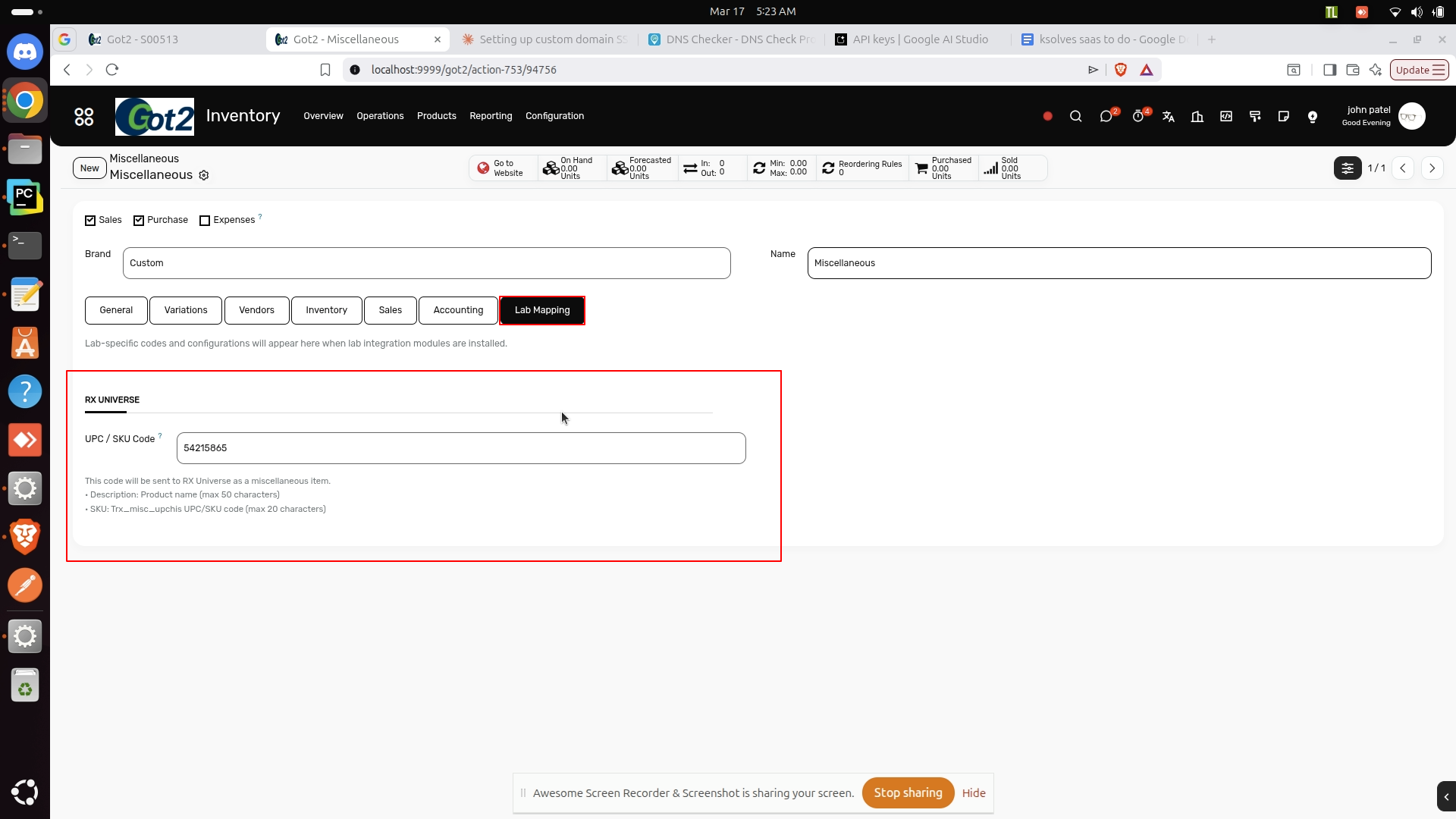
- Field: UPC / SKU Code
- Example:
123456789012orCLEAN-KIT-001 - Max length: 20 characters
- Used for: Products with category type
miscellaneous - Sent as:
miscItemsarray with desc + SKU
E. Remake Reasons
Path: Sales → Configuration → Remake Reasons → [Reason] → Lab Mapping Tab
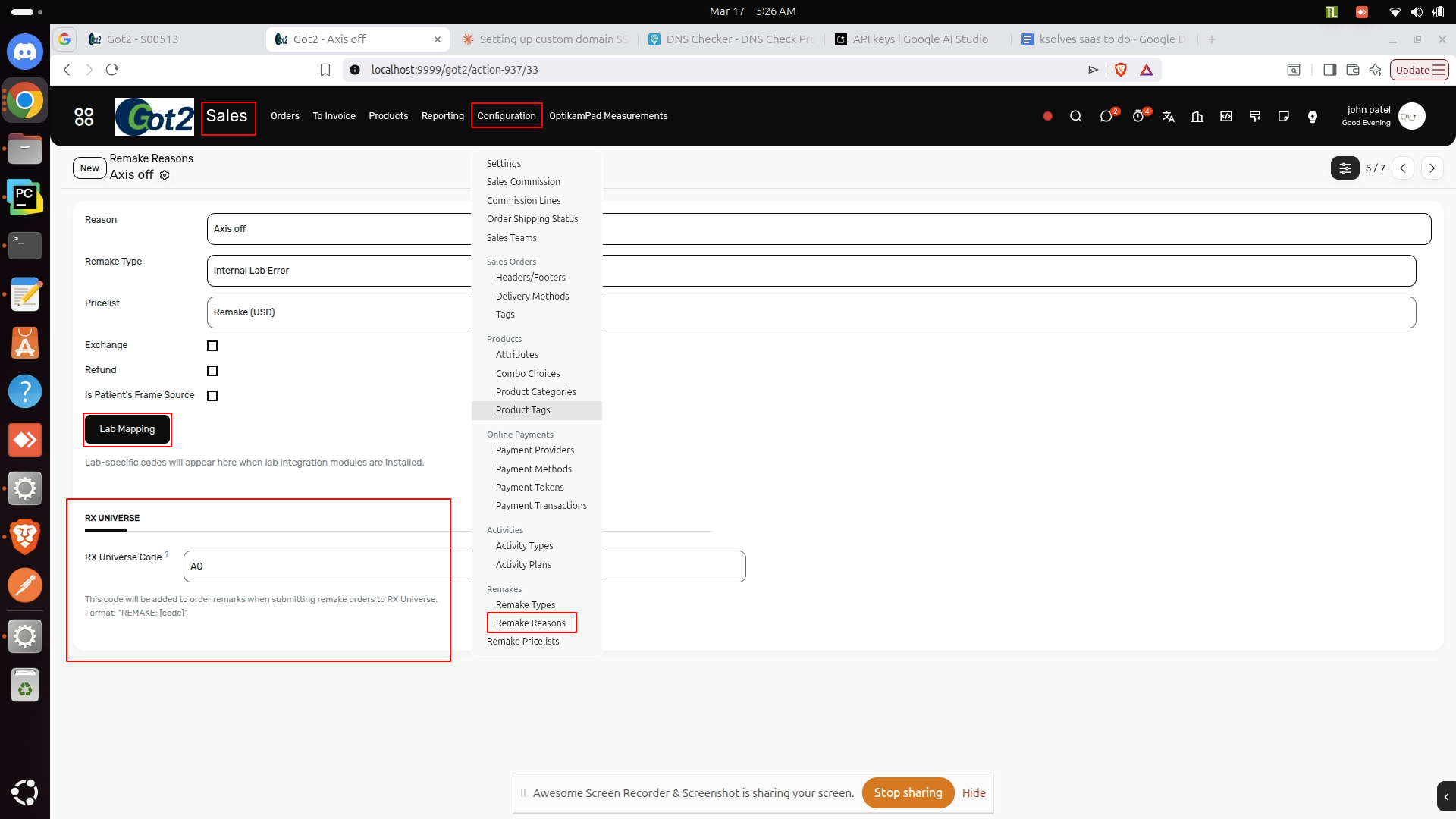
| Reason | Code |
|---|---|
| Wrong Prescription | WRONG_RX |
| Damaged | DAMAGED |
| Poor Quality | POOR_QUAL |
Note: If order is remake order then , the code is sent in addons array.
Submitting Orders
Path: Sales → sales → Open or Create New Order
To submit an order to RX Universe, you need to create a sale order, fill in all required information, and select the RX Universe lab supplier.
After click on the Send Button, before the Supplier
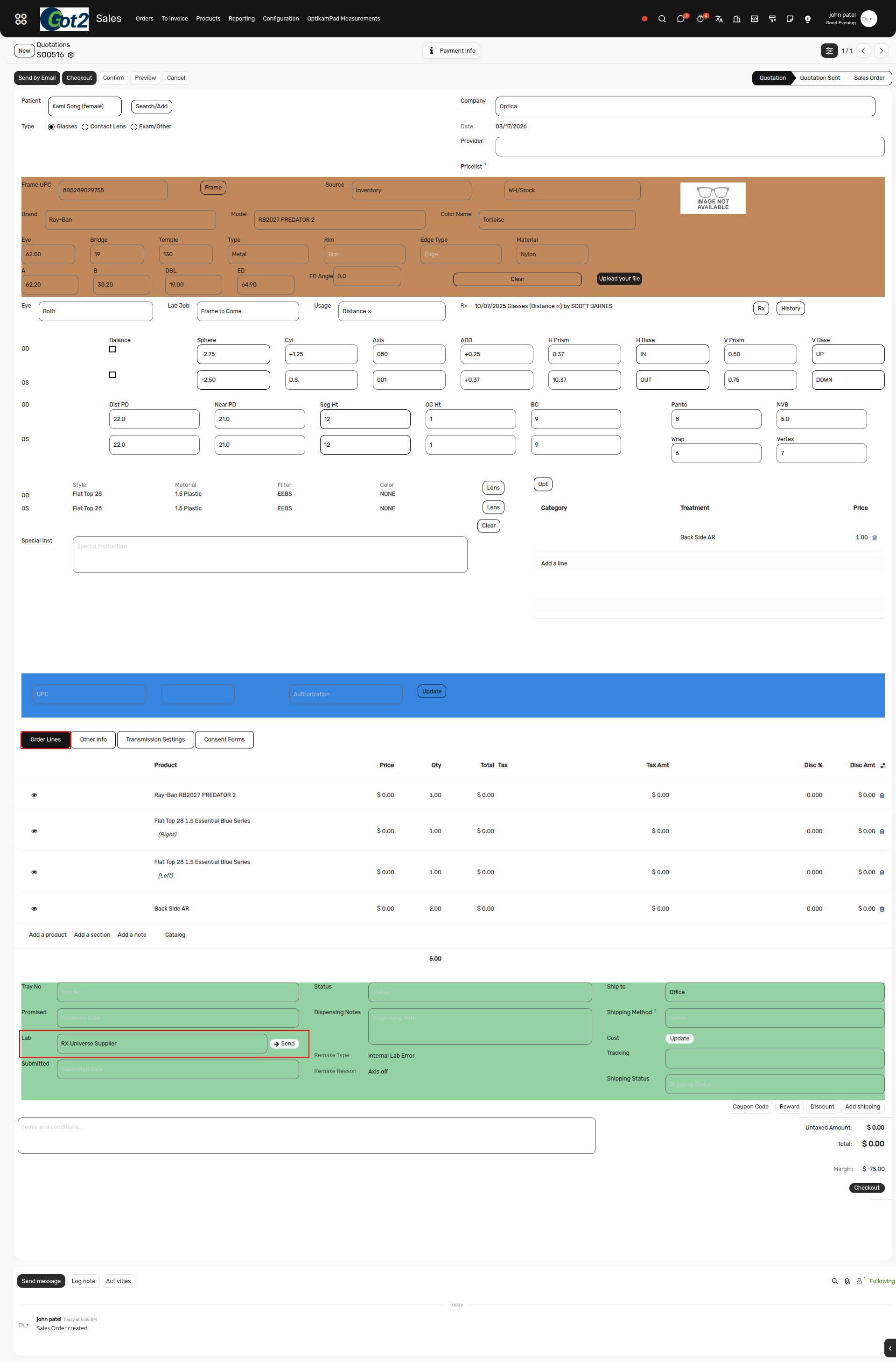
- If the data is incorrect, misconfigured, or missing, a validation error will occur.
- Review and correct the data properly.
- Submit the data again after making corrections.
- If the submission is successful, you will receive a notification like this.
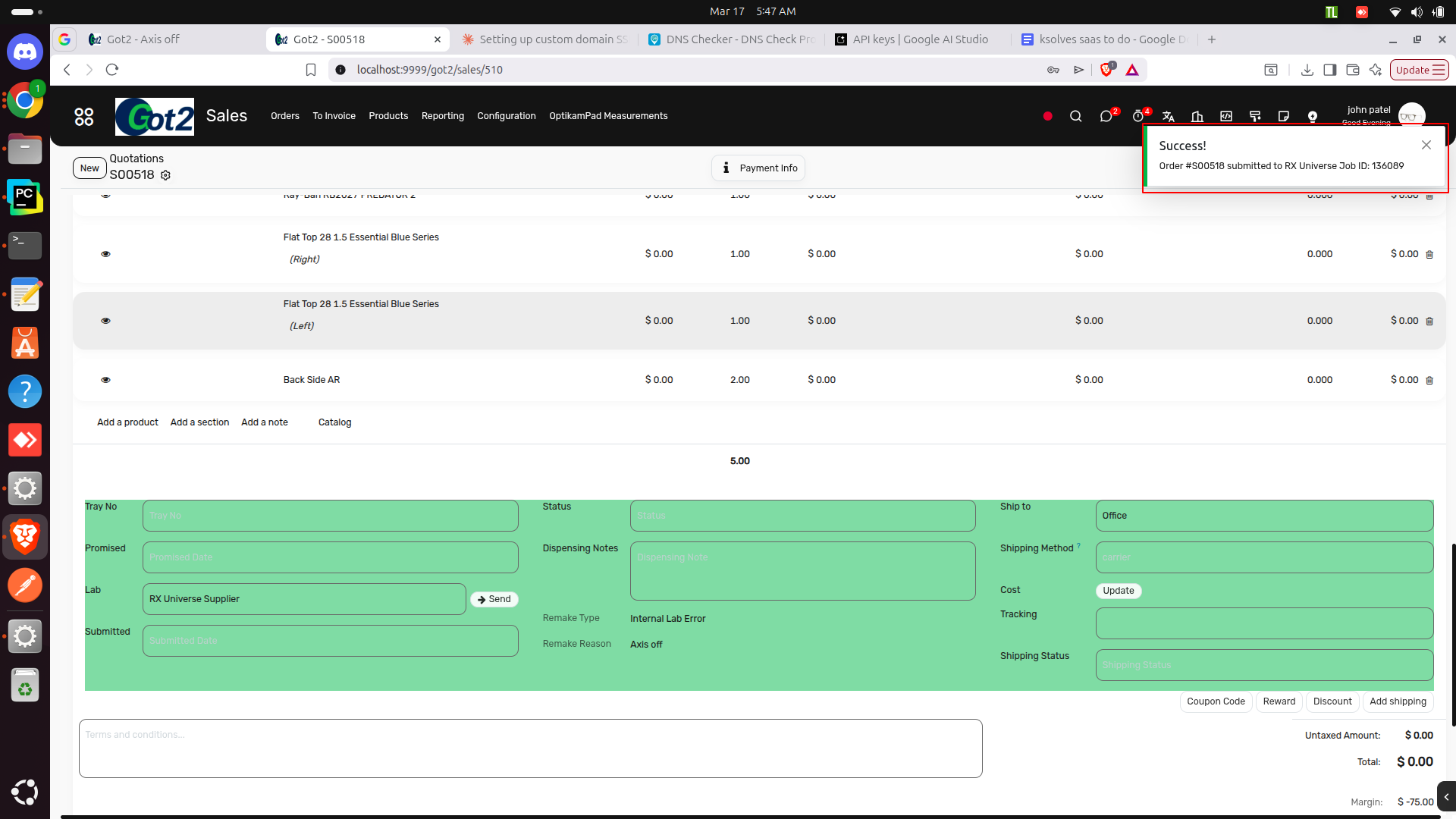
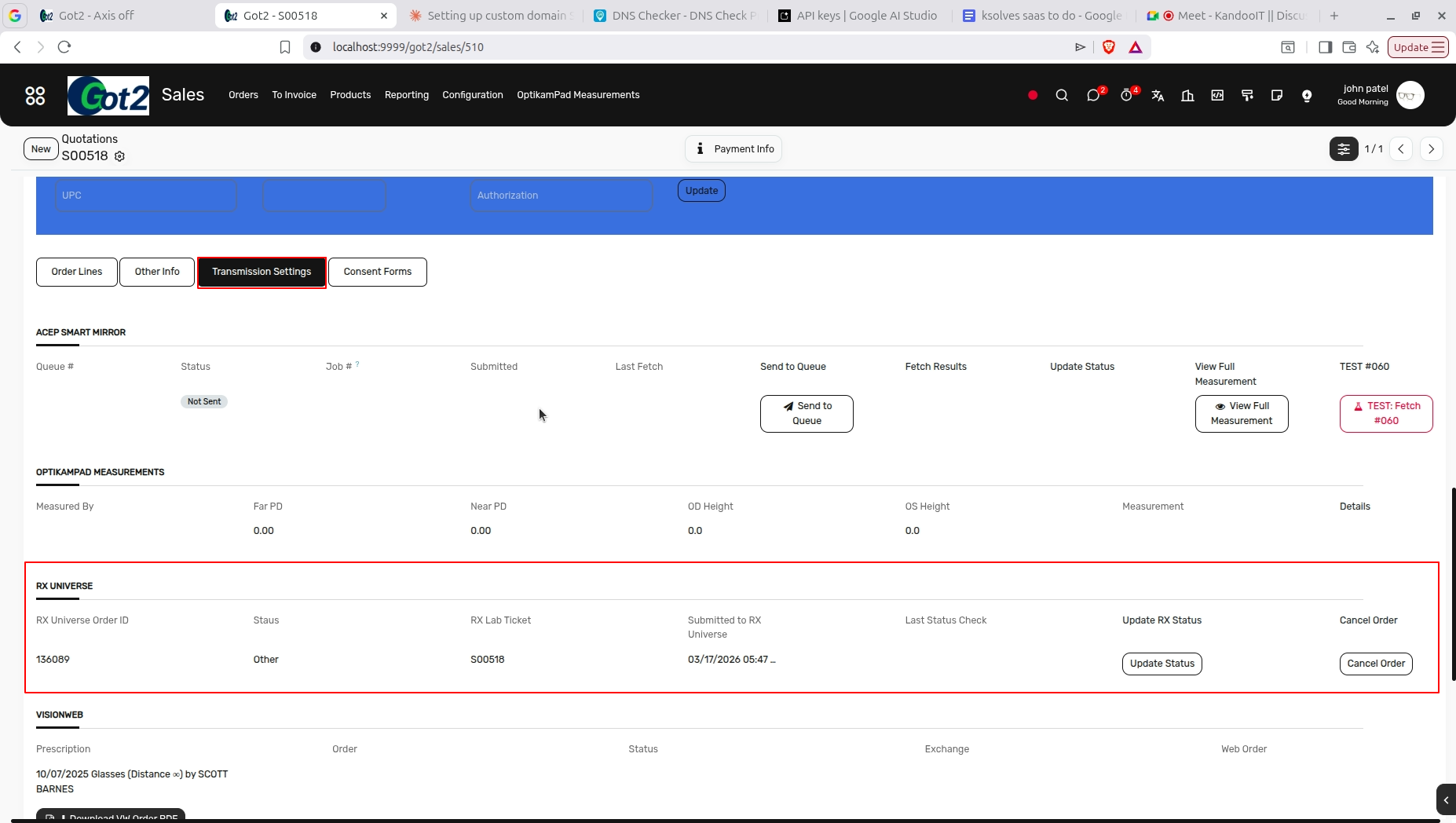
After then just move to the Transmission Settings tab and move to the Rx universe Section Here you can find all the Information About the Rx Universe .
Here update status and cancel order button is also avaiable , using that you can check the latest status of the order and also cancel that order.
Required Data:
| Section | Required Fields | Notes |
|---|---|---|
| Header | Patient, Vendor | Vendor must have RX Universe transmission method |
| Prescription | Sphere, Cyl, Axis, ADD (both eyes) | ADD in 0.25 increments |
| PD | Right IPD, Left IPD | Must be > 0 |
| Lenses | Right & Left lens products | Must have style + material codes |
| Frame | A ≥ 30mm, B ≥ 15mm, DBL > 0, Bridge > 0 | Full jobs only |
| Shipping | Valid address | Required |
Troubleshooting
Common Errors & Solutions
| Error | Solution |
|---|---|
| "Connection Failed" | Check Settings → Integration → RX Universe Lab Settings |
| "Customer Number not configured" | Settings → Companies → Enter customer number |
| "Frame B required (min 15mm)" | Enter B ≥ 15mm in order form |
| "Missing RX Style Code" | Product → Lab Mapping → Fill rx_style_code |
| "DBL required" | Enter DBL in frame measurements |
| "Treatment missing code" | Treatment product → Lab Mapping → Fill rx_treatment_code |
| "Remake missing code" | Remake Reason → Lab Mapping → Fill rx_universe_code |
| "ERROR 171: .25 increments" | Use 0.25, 0.50, 0.75, 1.00... for ADD/Prism |
| "ERROR 49: Invalid lens type" | Use Fetch Styles button to find valid codes |
Configuration Checklist
Before First Submission:
Global Settings:
- Settings → Integration → RX Universe Lab Settings configured
- Protocol: HTTP
- Host/IP: 131.100.38.99
- Port: 4567
Company Settings:
- Settings → Companies → Customer Number configured (e.g., FS, SA)
Test:
- Connection test successful (Fetch Materials works)
Products:
- Lens products have style + material codes
- Treatment products have treatment codes
- Frame types have frame codes
- Misc products have UPC/SKU codes
- Remake reasons have remake codes
Vendor:
- RX Universe vendor has transmission method set
Quick Diagnostics
Connection Test:
Product → Lab Mapping → Click "Fetch Materials"
Shows codes = Working
Error = Check Integration Settings
Settings Verification:
Settings → Integration → RX Universe Lab Settings
Protocol: HTTP
Host/IP: 131.100.38.99
Port: 4567

Settings → Companies → [Company]
Customer Number: FS
Quick Reference
Configuration Locations
| Setting | Location | Scope |
|---|---|---|
| Protocol, Host/IP, Port | Settings → Integration → RX Universe Lab Settings | Global (all companies) |
| Customer Number | Settings → Companies → [Company] | Per company |
| Lens Codes | Product → Lab Mapping | Per product |
| Treatment Codes | Product → Lab Mapping | Per product |
| Frame Type Codes | Configuration → Frame Types → Lab Mapping | Per frame type |
| Misc UPC/SKU | Product → Lab Mapping | Per product |
| Remake Codes | Configuration → Remake Reasons → Lab Mapping | Per reason |
| Vendor Setup | Contacts → Vendor → Sales & Purchase | Per vendor |
API Endpoints
| Endpoint | Status | Use |
|---|---|---|
| POST /v2/orders | Working | Submit order |
| GET /v2/pricing/material_groups | Working | Fetch materials |
| GET /v2/pricing/style_groups | Working | Fetch styles |
| GET /v2/orders/{id}/status | N/A | Use web portal |
| DELETE /v2/orders/{id} | N/A | Use web portal |
Payload Arrays
| Array | Contains | From |
|---|---|---|
remarks |
Special instructions | special_instruction field |
addons |
Treatment codes + Remake code | Treatment products + Remake reason |
miscItems |
Accessories with UPC/SKU | Miscellaneous products |
Example:
{
  "remarks": ["Patient needs rush delivery"],
  "addons": ["AR", "UV", "WRONG_RX"],
  "miscItems": [{"desc": "Cleaning Kit", "sku": "123456789012"}]
}
Field Limits
| Field | Type | Limit | Auto-Fix |
|---|---|---|---|
| ADD/Prism | float | 0.25 increments | Rounds |
| Base Curve | string | 5 chars | Truncates |
| Remark line | string | 35 chars | Splits |
| Remarks array | array | 11 items | Limits |
| Treatment code | string | 20 chars | Truncates |
| UPC/SKU | string | 20 chars | Truncates |
| Misc desc | string | 50 chars | Truncates |
| Frame A | integer | 0-99 | Clamps |
Test Accounts
SA , FS , TC , EG , PP , CH , GC
Available Codes (March 2026)
Materials: P (Plastic CR39), T (Transition)
Styles: SV (Single Vision) - Use Fetch buttons for complete list
Treatments: AR , UV , HC , BLF , SR (examples)
Frame Types: FULL , SEMI , RIMLESS (examples)